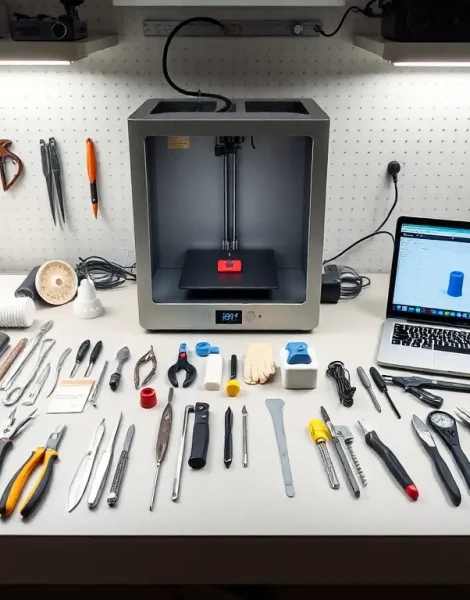
3D printing tools separate successful prints from frustrating failures. Every maker, whether hobbyist or professional, needs the right equipment to prepare, produce, and finish their creations. A quality printer alone won’t guarantee great results. The tools surrounding that printer matter just as much.
This guide covers the essential 3D printing tools every maker should own. From hand tools that handle daily tasks to software that prepares files for printing, each piece of equipment plays a specific role. Readers will learn which tools deserve a spot on their workbench and which ones they can skip.
Table of Contents
ToggleKey Takeaways
- Essential 3D printing tools include scrapers, flush cutters, precision knives, and needle-nose pliers for daily print handling and cleanup.
- Post-processing tools like sandpaper, files, and filler primers transform rough prints into smooth, professional-quality parts.
- Digital calipers and feeler gauges are critical calibration tools that ensure accurate, consistent print results.
- Free software tools such as Cura, PrusaSlicer, and Fusion 360 handle slicing and design without any cost to hobbyists.
- Safety gear including respirator masks, nitrile gloves, and proper ventilation protects makers from fumes, particles, and resin exposure.
- Regular maintenance with nozzle cleaning kits and lubricants extends printer life and prevents costly failed prints.
Must-Have Hand Tools for 3D Printing
Hand tools form the foundation of any 3D printing toolkit. These items handle the physical work of removing prints, cleaning parts, and making quick adjustments.
Scrapers and Spatulas
A good scraper removes prints from the build plate without damage. Metal spatulas work best for stubborn prints, while plastic versions protect delicate surfaces. Makers should keep both types nearby.
Flush Cutters and Snips
Flush cutters trim support material cleanly. They cut close to the surface without leaving raised nubs. Quality snips make a noticeable difference in final part appearance.
Precision Knife Set
X-Acto knives and similar precision blades handle detail work. They remove small imperfections, clean up edges, and trim strings from prints. A set with interchangeable blades offers the most flexibility.
Needle-Nose Pliers
These pliers reach into tight spaces to remove support structures. Long, thin jaws grip small pieces without crushing surrounding areas. Every 3D printing tools collection needs at least one pair.
Allen Key and Hex Driver Sets
Most 3D printers use hex bolts for assembly and adjustment. A complete set of Allen keys, both metric and imperial, handles nearly every printer maintenance task. T-handle versions provide better torque for stubborn fasteners.
Surface Finishing and Post-Processing Tools
Raw prints rarely look perfect. Post-processing tools transform rough surfaces into smooth, professional-quality parts.
Sandpaper and Sanding Blocks
Sandpaper removes layer lines and surface imperfections. Start with coarse grits (100-200) and work toward fine grits (400-2000) for smooth finishes. Sanding blocks keep pressure even across flat surfaces.
Files and Rasps
Needle files shape small details and clean tight corners. Larger files remove material quickly from bigger surfaces. A variety pack covers most finishing needs.
Heat Gun
A heat gun smooths certain plastics and speeds up drying times for paints and coatings. It also helps with part assembly by softening material for press-fits. Temperature control matters, cheap heat guns can melt parts entirely.
Filler Primers and Putties
These products fill layer lines before painting. Filler primer sprays on quickly and sands smooth. Modeling putty handles deeper imperfections. Both products improve paint adhesion.
UV Curing Station
Resin printers require UV light to fully cure parts. A dedicated curing station provides even exposure and consistent results. Some makers build their own using UV LED strips, though commercial options save time.
Maintenance and Calibration Equipment
Regular maintenance keeps 3D printers running smoothly. The right calibration equipment ensures accurate, consistent prints.
Digital Calipers
Calipers measure filament diameter, part dimensions, and calibration test prints. Digital versions display measurements instantly. Accuracy to 0.01mm helps catch problems before they ruin prints.
Feeler Gauges
Feeler gauges set precise gaps for bed leveling. A 0.1mm gauge provides the standard distance for most printer setups. This simple tool eliminates guesswork from the leveling process.
Nozzle Cleaning Kit
Clogged nozzles cause failed prints. Cleaning kits include acupuncture needles, cleaning filament, and brass brushes. Regular cleaning prevents clogs and maintains print quality. These 3D printing tools pay for themselves quickly.
Spare Nozzles
Nozzles wear out over time, especially with abrasive filaments. Keeping spares on hand prevents downtime. Different sizes (0.2mm to 0.8mm) enable different print qualities and speeds.
Lubricants
Linear rails and lead screws need periodic lubrication. PTFE-based lubricants work well for most printer components. White lithium grease handles heavier-duty applications. A small investment in lubricants extends printer life significantly.
Software Tools for 3D Print Preparation
Software transforms digital designs into printable files. The right programs streamline the entire workflow.
Slicers
Slicers convert 3D models into printer instructions (G-code). Popular options include Cura, PrusaSlicer, and Simplify3D. Each slicer offers different features and preset profiles. Most makers try several before settling on a favorite.
CAD Software
CAD programs create original 3D models. Fusion 360 offers professional features with a free hobbyist license. TinkerCAD works well for beginners. Blender handles organic shapes and artistic designs.
Mesh Repair Tools
Downloaded models often contain errors that cause print failures. Mesh repair tools fix holes, inverted normals, and non-manifold geometry. Meshmixer and Microsoft 3D Builder handle most common problems.
File Converters
Different programs use different file formats. Converters translate between STL, OBJ, 3MF, and other formats. Online converters work for quick jobs, while desktop software handles batch processing.
These software 3D printing tools cost nothing in most cases. Free options handle nearly every task a hobbyist encounters.
Safety Gear and Workspace Essentials
3D printing involves heat, chemicals, and fine particles. Proper safety gear protects makers from common hazards.
Respirator Mask
Printing certain materials releases fumes and ultrafine particles. A respirator with appropriate filters protects lungs during printing and post-processing. N95 masks work for dust: organic vapor cartridges handle chemical fumes from resins.
Safety Glasses
Flying debris from cutting and sanding poses eye risks. Safety glasses should stay on during all post-processing work. UV-blocking versions protect eyes when working with resin printers.
Nitrile Gloves
Uncured resin causes skin irritation and sensitization. Nitrile gloves provide a barrier during handling. They also keep fingerprints off finished parts before painting.
Ventilation Equipment
Enclosures with HEPA and carbon filters capture particles and fumes. Portable fume extractors work for small spaces. Proper ventilation makes printing safer and more pleasant.
Work Mat
A silicone work mat protects surfaces from resin spills, adhesive residue, and scratches. Easy cleanup saves time and keeps the workspace organized. This simple addition to any 3D printing tools setup prevents many headaches.
Fire Safety
3D printers generate significant heat. A smoke detector near the printer provides early warning. A fire extinguisher rated for electrical fires should be within reach. These precautions matter, printer fires, while rare, do happen.